Best Webcams in 2026: Logitech C920x vs NexiGo N60 vs EMEET C960 4K vs Logitech C920e
A good webcam is one of those upgrades you barely notice—until you compare it with a bad one.
Whether you’re joining daily Zoom meetings, working from home, streaming, teaching online, or simply calling family, clear video and reliable audio can make a surprisingly big difference.
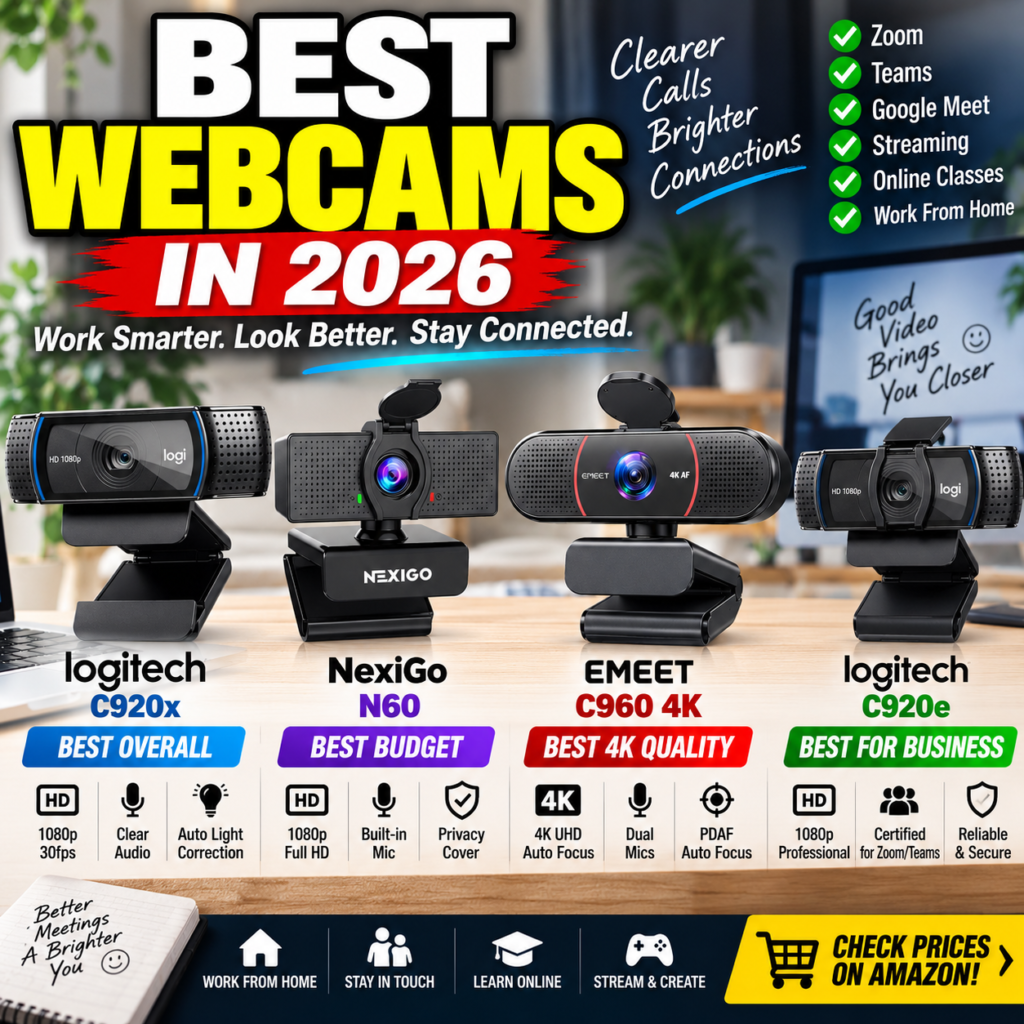
For this comparison, I’m looking at four popular webcam options available on Amazon:
- Logitech C920x HD Pro — proven all-around 1080p choice
- NexiGo N60 — budget-friendly webcam with privacy cover
- EMEET C960 4K — higher-resolution option with autofocus
- Logitech C920e — business-focused 1080p webcam
The interesting part? The most expensive webcam isn’t automatically the best choice for everyone.
Affiliate Disclosure: As an Amazon Associate, I earn from qualifying purchases at no additional cost to you. Prices and availability can change at any time.
Quick Comparison
| Webcam | Resolution | Standout Feature | Best For |
|---|---|---|---|
| Logitech C920x | 1080p/30fps | Proven image quality | Best overall |
| NexiGo N60 | 1080p | Privacy cover + low price | Best budget |
| EMEET C960 4K | 4K | Autofocus + dual mics | Best image detail |
| Logitech C920e | 1080p | Business/meeting focus | Best for work |
My quick picks:
🏆 Best Overall: Logitech C920x
💰 Best Budget: NexiGo N60
🎥 Best 4K Option: EMEET C960 4K
💼 Best for Business: Logitech C920e
1. Logitech C920x HD Pro — Best Overall


4
The Logitech C920x HD Pro remains one of the easiest webcams to recommend because it focuses on the things most people actually need.
It offers Full HD 1080p video at 30 fps, built-in audio, automatic light correction, and broad compatibility with popular video-conferencing platforms.
It’s not trying to be an ultra-premium creator camera. Instead, it offers a dependable combination of video quality, compatibility, and ease of use.
Why I like it
Pros
- 1080p Full HD
- 30fps video
- Automatic light correction
- Established Logitech webcam platform
- Good option for Zoom, Teams and Meet
- Works well for everyday home-office use
Cons
- Limited to 30fps at 1080p in this configuration
- More expensive than many entry-level 1080p webcams
- Doesn’t offer native 4K resolution
Who should buy it?
If you just want a webcam that you can install and use for years without obsessing over specifications, this is probably the safest choice of the four.
Check the Logitech C920x on Amazon:
View Logitech C920x on Amazon
2. NexiGo N60 — Best Budget Webcam


4
The NexiGo N60 takes a different approach.
Instead of competing with premium webcams, it delivers the essentials at a substantially lower entry price.
You still get 1080p video, a built-in microphone, USB plug-and-play operation, software control, and an integrated privacy cover.
That last feature is especially useful for a webcam permanently attached to a work computer.
Close the cover when you’re finished with your meeting, and you’re done.
Why I like it
Pros
- Affordable
- 1080p resolution
- Built-in microphone
- Physical privacy cover
- Plug-and-play USB connection
- Software controls
- Good entry-level work-from-home option
Cons
- Image quality isn’t aimed at premium content creation
- Less compelling for users specifically looking for 4K
- More basic overall than higher-end alternatives
Who should buy it?
Students, occasional Zoom users, secondary-computer users and anyone who simply thinks:
“I just need a webcam that works.”
This is where the N60 makes a lot of sense.
Check the NexiGo N60 on Amazon:
View NexiGo N60 on Amazon
3. EMEET C960 4K — Best for Image Quality


4
Here’s where the comparison gets more interesting.
The EMEET C960 4K moves beyond standard 1080p by offering 4K resolution, along with PDAF autofocus, dual omnidirectional microphones and automatic light correction.
For someone who spends hours every week on camera, the additional detail can make the upgrade worthwhile.
It is particularly attractive for:
- Remote professionals
- Online instructors
- Consultants
- Content creators
- Presentations
- Higher-quality video calls
The autofocus capability also gives it an advantage when you’re moving around rather than sitting perfectly still.
Why I like it
Pros
- 4K video
- PDAF autofocus
- Dual microphones
- 73° field of view
- Automatic light correction
- Privacy cover
- Plug-and-play operation
Cons
- 4K isn’t necessary for ordinary Zoom calls
- Some conferencing platforms may reduce transmitted resolution
- More camera than casual users need
Who should buy it?
Choose this one when image quality matters more than simply getting the lowest price.
If your webcam is part of how clients, customers or viewers see you, spending a little more on image quality becomes much easier to justify.
Check the EMEET C960 4K on Amazon:
View EMEET C960 4K on Amazon
4. Logitech C920e — Best for Business Meetings


6
The Logitech C920e is the business-oriented option in this group.
It delivers 1080p video and is positioned around professional conferencing, including Zoom and Microsoft Teams compatibility.
This makes it particularly attractive for people whose webcam isn’t primarily for streaming or casual calls—it’s a work tool.
Think:
Monday morning meeting. Client presentation. Teams call. Another Zoom call. Repeat tomorrow.
That’s the environment where the C920e makes the most sense.
Why I like it
Pros
- 1080p video
- Designed around business conferencing
- Zoom/Teams-oriented positioning
- Logitech ecosystem
- Professional-looking video
- Strong choice for dedicated home-office setups
Cons
- Costs more than budget 1080p alternatives
- Still 1080p rather than 4K
- Casual users may get better value elsewhere
Who should buy it?
If video conferencing is part of your actual job rather than something you do occasionally, the C920e deserves serious consideration.
Check the Logitech C920e on Amazon:
View Logitech C920e on Amazon
Which Webcam Should You Buy?


6
Here’s the easiest way to decide.
Buy Logitech C920x if…
You want the best balance of reliability, quality and simplicity.
👉 Check Logitech C920x price on Amazon
Buy NexiGo N60 if…
You want 1080p without spending much money.
👉 Check NexiGo N60 price on Amazon
Buy EMEET C960 4K if…
You care about 4K resolution, autofocus and better image detail.
👉 Check EMEET C960 4K price on Amazon
Buy Logitech C920e if…
Your webcam will primarily be used for professional Zoom and Teams meetings.
👉 Check Logitech C920e price on Amazon
Final Verdict
For most people, I’d start with the Logitech C920x. It sits in the sweet spot where you’re paying for a proven Full HD webcam without moving into features many users won’t need.
The NexiGo N60 is the value play. If you’re mainly joining meetings a few times per week, there’s little reason to overspend.
The EMEET C960 4K is the most interesting upgrade for creators and professionals who care about how they look on camera.
And the Logitech C920e makes the strongest case when your webcam is primarily a business productivity tool.
Bottom line: don’t pay for specifications you won’t use. Buy the webcam that matches what you’ll actually do in front of it.
Before You Buy
Amazon pricing changes frequently, so compare the current price rather than relying on an older advertised price.
All four options:
Logitech C920x — Check Current Price
NexiGo N60 — Check Current Price