Turning an older TV into a smarter streaming setup can cost surprisingly little.
But when you start shopping, one question comes up immediately:
Fire TV or Roku—and which version should you actually buy?
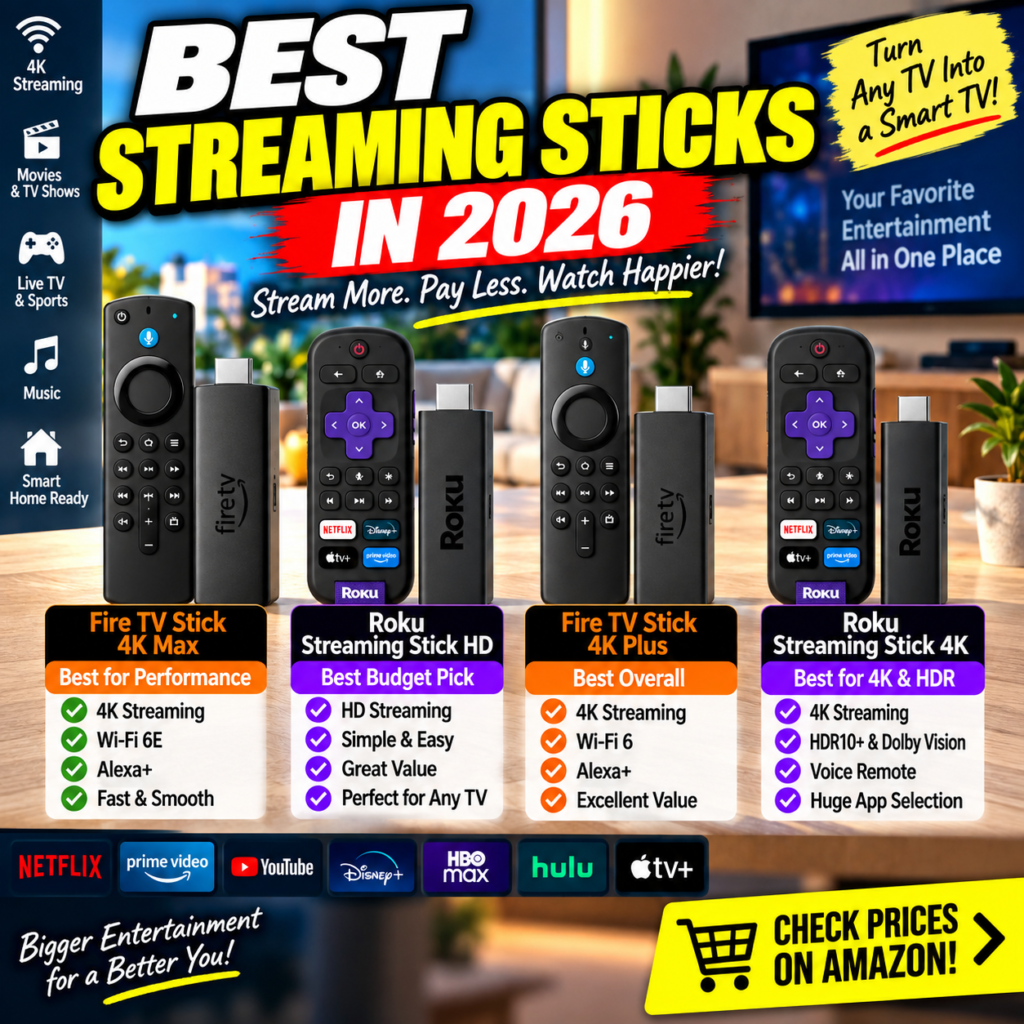
For this comparison, we’re looking at four popular options:
- Amazon Fire TV Stick 4K Max
- Roku Streaming Stick HD
- Amazon Fire TV Stick 4K Plus
- Roku Streaming Stick 4K
The important thing isn’t simply finding the most powerful model. It’s finding the one whose features you’ll actually use.
Quick Pick: For a typical 4K television, the Fire TV Stick 4K Plus offers an attractive balance. Performance-focused buyers should consider the Fire TV Stick 4K Max, while Roku fans can choose between HD and 4K according to their television.
As an Amazon Associate, I earn from qualifying purchases. This article contains affiliate links.
🔥 Fire TV vs Roku: The Four Contenders


The four products fall naturally into two categories.
Fire TV emphasizes Amazon/Alexa integration, while Roku is particularly attractive to shoppers who prefer Roku’s streaming platform.
There’s also another, arguably more important distinction:
HD vs. 4K.
If your television supports 4K, buying an HD-only streaming stick purely to save a little money may not provide the best long-term value.
🏆 Quick Picks
Best Overall — Fire TV Stick 4K Plus
4K streaming, Wi-Fi 6 and Alexa make this the model I’d consider first for a mainstream 4K TV.
Check Fire TV Stick 4K Plus on Amazon
Best Performance — Fire TV Stick 4K Max
The performance-oriented choice, particularly for shoppers who want Wi-Fi 6E and a higher-end Fire TV configuration.
Check Fire TV Stick 4K Max on Amazon
Best Budget Pick — Roku Streaming Stick HD
A sensible choice for an older bedroom, guest-room or 1080p television.
Check Roku Streaming Stick HD on Amazon
Best Roku for 4K — Roku Streaming Stick 4K
The Roku option for shoppers who want 4K plus HDR capabilities.
Check Roku Streaming Stick 4K on Amazon
Streaming Stick Comparison Chart
| Model | Resolution | Wireless | Standout Feature | Best For |
|---|---|---|---|---|
| Fire TV Stick 4K Max | 4K | Wi-Fi 6E | Higher-end Fire TV | Performance |
| Roku Streaming Stick HD | HD | Wi-Fi | Simple & affordable | Budget/HD TV |
| Fire TV Stick 4K Plus | 4K | Wi-Fi 6 | Alexa + 4K | Most users |
| Roku Streaming Stick 4K | 4K | Wi-Fi | HDR10+ / Dolby Vision | Roku users |
Amazon prices and promotions change frequently, so rather than relying on a fixed price in this article, use the links below to check the current offer.
1. Amazon Fire TV Stick 4K Max
Best for Performance


The Fire TV Stick 4K Max is the model I’d look at when performance matters more than getting the lowest possible price.
Based on the supplied product listing, one of its important differentiators is Wi-Fi 6E support.
For a household already using Alexa, Echo devices, Prime Video and other Amazon services, Fire TV also fits naturally into the existing ecosystem.
Why Buy It?
You’re not paying extra simply to watch Netflix.
Less expensive devices can already do that.
The Max makes more sense when you want a higher-performance streaming device that you’re unlikely to feel the need to replace quickly.
Pros
✓ 4K streaming
✓ Wi-Fi 6E
✓ Alexa integration
✓ Performance-focused model
✓ Strong choice for a primary TV
Cons
✗ More device than an HD television needs
✗ Usually more expensive than entry-level sticks
✗ Amazon-focused interface isn’t everyone’s preference
Best For
4K TV owners, frequent streamers, Alexa households and performance-focused buyers.
👉 Check Latest Price — Fire TV Stick 4K Max
2. Roku Streaming Stick HD
Best Budget Streaming Stick


Here’s where it’s easy to overspend.
If the television you’re upgrading only supports 1080p HD, paying more solely to get 4K output isn’t necessarily useful.
That’s exactly where the Roku Streaming Stick HD fits.
It can be particularly attractive for:
Bedroom TVs
Guest-room TVs
Older televisions
Secondary TVs
Budget streaming setups
This leads to a useful buying rule:
The best value isn’t necessarily the cheapest product. It’s the least expensive product that does everything you need.
Pros
✓ Lower-cost entry point
✓ Compact streaming stick
✓ Voice remote
✓ Simple choice for HD TVs
✓ Good secondary-TV option
Cons
✗ No 4K output
✗ Not ideal for a new 4K television
✗ Less future-proof if you’re planning a TV upgrade
Best For
Anyone who owns a 1080p TV and doesn’t intend to replace it soon.
👉 Check Latest Price — Roku Streaming Stick HD
3. Amazon Fire TV Stick 4K Plus
⭐ Best Overall for Most People


For the average buyer with a 4K television, this may be the sweet spot.
The Fire TV Stick 4K Plus combines the capabilities most mainstream buyers actually want:
4K streaming + Wi-Fi 6 + Alexa integration.
And that’s important.
You don’t necessarily need to buy the most expensive version just because it’s technically better.
A better question is:
Will I actually use the additional capabilities I’m paying for?
If you’re mainly watching Netflix, Prime Video, YouTube, Disney+ and other mainstream services on a 4K television, this model deserves serious consideration.
Pros
✓ 4K streaming
✓ Wi-Fi 6
✓ Alexa-powered search
✓ Good balance of capability and cost
✓ Strong living-room choice
Cons
✗ Max remains the performance-oriented upgrade
✗ Amazon-heavy interface may not appeal to Roku users
✗ Overkill for an older HD television
Best For
The average household upgrading a 4K television.
👉 Check Latest Price — Fire TV Stick 4K Plus
4. Roku Streaming Stick 4K
Best Roku Choice for a 4K TV


What if you want 4K but simply prefer Roku?
Then this is the more logical Roku model to examine.
The supplied listing highlights 4K, HDR10+ and Dolby Vision, making it considerably more appropriate for a modern 4K television than the HD model.
At this point the decision between Fire TV and Roku becomes less about raw specifications and more about the ecosystem and interface you prefer.
Pros
✓ 4K streaming
✓ HDR10+
✓ Dolby Vision
✓ Roku platform
✓ Voice remote
Cons
✗ HD model costs less if 4K isn’t needed
✗ Fire TV integrates more naturally into Alexa-heavy homes
✗ Platform preference becomes a major factor
Best For
4K TV owners who prefer Roku’s platform.
👉 Check Latest Price — Roku Streaming Stick 4K
🔥 Fire TV vs Roku: Which Ecosystem Is Better?


5
This is where the decision becomes personal.
Choose Fire TV if:
You already use Alexa heavily, watch Prime Video frequently or prefer Amazon’s ecosystem.
Choose Roku if:
You prefer Roku’s interface and want the streaming platform itself to remain the focus.
For many households, either ecosystem can handle mainstream streaming needs perfectly well.
That’s why I’d choose based on your TV resolution + preferred ecosystem + budget, rather than brand alone.
HD vs 4K: Don’t Buy Twice
This is probably the most useful buying advice in this comparison.
Suppose you currently have a 1080p television.
If you’re going to keep it for several more years, buying the Roku HD makes sense.
But suppose you’re planning to upgrade to a 4K television next year.
Buying the cheapest HD streamer today could mean buying another streaming device later.
Sometimes spending slightly more initially can be cheaper over the full ownership period.
That’s what Americans often mean by “buy once, cry once.”
🥇 Final Ranking
| Rank | Product | Why |
|---|---|---|
| 🥇 | Fire TV Stick 4K Plus | Best overall balance |
| 🥈 | Fire TV Stick 4K Max | Best performance |
| 🥉 | Roku Streaming Stick 4K | Best Roku 4K choice |
| 💰 | Roku Streaming Stick HD | Best budget/HD option |
Which One Should You Buy?
Have a 1080p TV?
→ Roku Streaming Stick HD
Have a normal 4K TV?
→ Fire TV Stick 4K Plus
Want better Fire TV performance?
→ Fire TV Stick 4K Max
Love Roku and own a 4K TV?
→ Roku Streaming Stick 4K
Planning to upgrade your TV soon?
→ I’d skip HD and buy a 4K model now.
🛒 Check Today’s Amazon Prices
Because Amazon prices and promotions can change, check the current offer before deciding.
Fire TV Stick 4K Max
👉 Check Latest Price on Amazon
Roku Streaming Stick HD
👉 Check Latest Price on Amazon
Fire TV Stick 4K Plus
👉 Check Latest Price on Amazon
Roku Streaming Stick 4K
👉 Check Latest Price on Amazon
FAQ
Is Fire TV Stick 4K Max worth paying extra for?
It can be if you want the performance-oriented Fire TV model and can benefit from features such as Wi-Fi 6E. Mainstream users may find the 4K Plus sufficient.
Is Roku better than Fire TV?
It depends primarily on interface and ecosystem preference. Amazon/Alexa households have a strong reason to consider Fire TV, while users who prefer Roku’s platform may be happier with Roku.
Do I need 4K?
If your television is 1080p and you’re keeping it for years, no. For a 4K television—or an upcoming TV upgrade—a 4K streaming stick is the more sensible purchase.
Can a streaming stick improve an old Smart TV?
It can improve the streaming experience when the TV’s built-in operating system has become slow, outdated or lacks apps you want.