As an Amazon Associate, we may earn from qualifying purchases at no additional cost to you.
One USB-C port can do a lot—until you need to connect a monitor, external drive, keyboard, SD card, charger, and a few accessories at the same time.
That’s exactly where a good USB-C hub earns its place in your laptop bag.
But here’s the bigger question:
Do you really need a $30+ docking station, or can a $9 USB-C hub do everything you need?
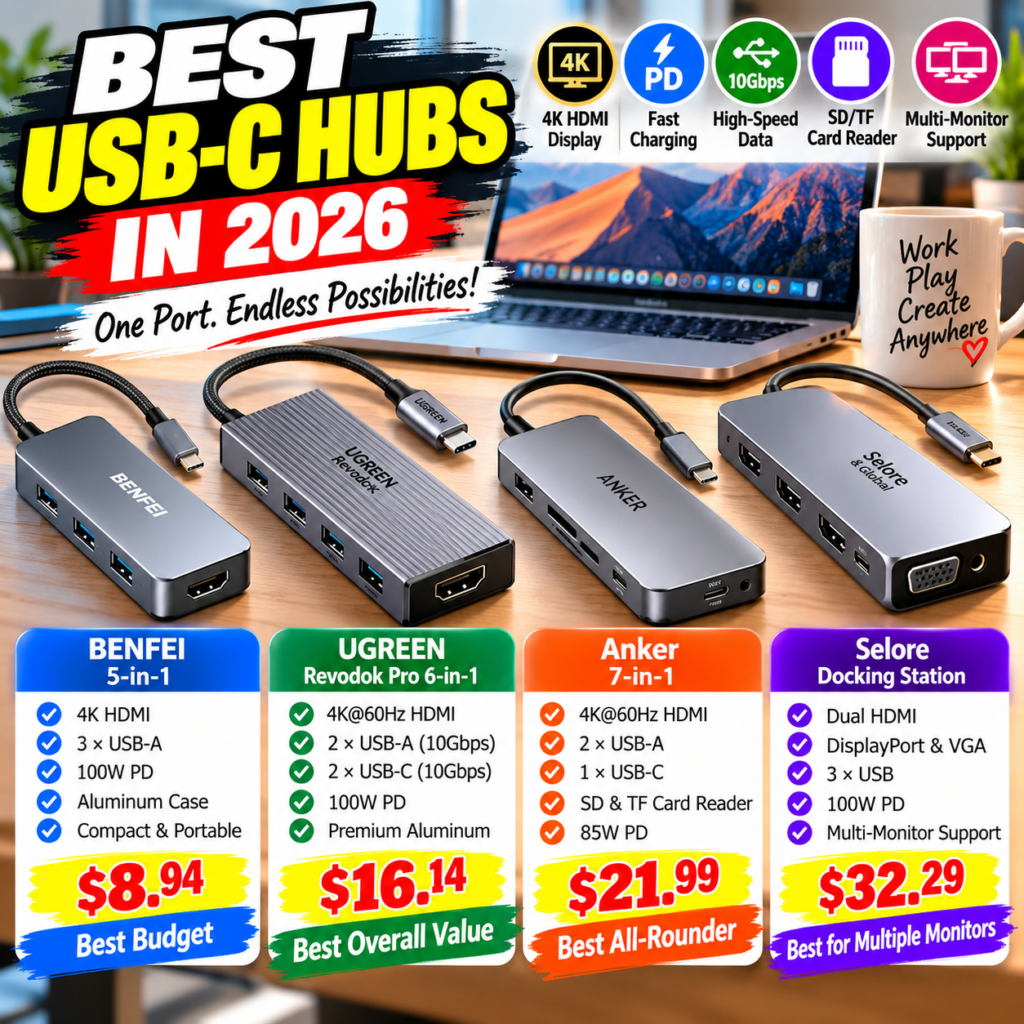
We compared four affordable options from BENFEI, UGREEN, Anker, and Selore, ranging from just $8.94 to $32.29 at the time of our comparison.
The answer depends less on the brand name and more on what you’re actually connecting to your laptop.
Quick Comparison
| USB-C Hub | Price Shown* | Key Feature | HDMI | PD Charging | Best For |
|---|---|---|---|---|---|
| BENFEI 5-in-1 | $8.94 | Essential ports | 4K HDMI | Up to 100W input | 💰 Best Budget |
| UGREEN Revodok Pro 6-in-1 | $16.14 | 10Gbps data | 4K@60Hz | 100W input | 🏆 Best Overall Value |
| Anker 7-in-1 | $21.99 | SD + TF readers | 4K@60Hz | 85W max input | ⭐ Best All-Rounder |
| Selore Docking Station | $32.29 | Multi-display outputs | Dual HDMI + DP + VGA | 100W input | 🖥️ Best for Multiple Monitors |
*Prices are those shown in the supplied Amazon screenshots and can change at any time.
Quick Picks
🏆 Best Overall Value — UGREEN Revodok Pro
The sweet spot for many laptop users: 10Gbps-capable data ports, 4K@60Hz HDMI and 100W PD input for only $16.14 shown.
💰 Best Budget — BENFEI 5-in-1
At just $8.94 shown, it covers the essentials: HDMI, three USB-A ports and USB-C PD.
⭐ Best All-Rounder — Anker 7-in-1
Costs more, but adds SD and TF/microSD card readers—particularly useful for photographers and creators.
🖥️ Best for Multiple Monitors — Selore
This is the specialist pick. Multiple video outputs make it much more appropriate for elaborate desk setups.
1. UGREEN Revodok Pro 6-in-1 — Best Overall Value
Price Shown: $16.14*
For most buyers, UGREEN Revodok Pro is where price and capability meet.
The supplied listing describes a 6-in-1 hub with two 10Gbps USB-C data ports, two 10Gbps USB-A ports, 4K@60Hz HDMI, and USB-C Power Delivery input rated up to 100W.
That is a surprisingly useful package for the captured $16.14 price.
Why It Stands Out
Cheap USB hubs often solve one problem—more ports.
UGREEN goes further by focusing on faster data connectivity as well.
That matters if you’re regularly transferring large files to and from portable SSDs rather than simply connecting a mouse or keyboard.
What You Get
- 6-in-1 design
- 2 × USB-C data ports
- 2 × USB-A data ports
- Up to 10Gbps advertised data connectivity
- 4K@60Hz HDMI
- Up to 100W PD input
- Compact aluminum-style housing
- Braided integrated cable
Pros
- Strong feature-to-price ratio
- 10Gbps-capable ports
- 4K@60Hz HDMI
- USB-A and USB-C data connectivity
- 100W PD input
- Compact enough for travel
Cons
- No SD card reader
- Only one display output
- Actual charging delivered to the laptop can be lower than the charger’s input wattage because the hub itself consumes power
Best For
MacBook, Windows laptop, iPad Pro, Steam Deck and everyday laptop users who want fast data, HDMI and charging from one compact hub.
Verdict
🏆 Best Overall Value
At $16.14 shown, this is probably the easiest product in the comparison to recommend to the broadest group of shoppers.
You’re not paying for ports you may never use, but you’re getting more performance headroom than with a basic entry-level hub.
Check Latest Price on Amazon – UGREEN Revodok Pro
2. BENFEI 5-in-1 USB-C Hub — Best Budget
Price Shown: $8.94*
This is where the comparison gets interesting.
Less than $9 for a USB-C hub?
According to the supplied listing, BENFEI gives you a 5-in-1 configuration with HDMI, three USB-A connections and USB-C Power Delivery input.
The listing advertises 4K HDMI and 100W PD input support.
For somebody who simply wants to turn one USB-C port into a practical desktop connection point, that’s a lot of utility for very little money.
The $8.94 Question
What do most people actually need?
For a basic laptop setup, it’s often:
HDMI + keyboard + mouse + flash drive + charging.
BENFEI is designed around exactly that kind of use.
Pros
- Lowest captured price
- 5-in-1 design
- HDMI output
- Three USB-A connections
- USB-C PD input
- Compact design
- Braided cable
- Very inexpensive upgrade for a laptop
Cons
- Fewer ports than the other models
- No SD/microSD reader
- Less connectivity than UGREEN
- Not designed as a multi-monitor docking station
Best For
Students, travelers, MacBook Air owners and anyone who needs basic HDMI and USB expansion without spending much.
What You Get for $8.94
This is exactly the kind of product that can convert well in an affiliate comparison.
The buying argument isn’t:
“This is the most powerful hub.”
It’s:
“Do I actually need to spend more?”
If you only need basic ports, the answer may be no.
Verdict
💰 Best Budget USB-C Hub
BENFEI proves that a useful laptop accessory doesn’t necessarily need to cost $30 or $50.
Check Latest Price on Amazon – BENFEI
3. Anker 7-in-1 USB-C Hub — Best All-Rounder
Price Shown: $21.99*
Anker moves the comparison in another direction.
The supplied listing shows a 7-in-1 USB-C hub with:
- HDMI
- 2 × USB-A
- USB-C data
- USB-C PD input
- SD card reader
- TF/microSD card reader
It advertises 4K@60Hz HDMI and up to 85W max PD input.
Why Pay More for Anker?
The most important difference isn’t the logo.
It’s the SD and microSD/TF card slots.
If you shoot photos or video, those two little slots can eliminate the need to carry another card reader.
That’s real utility.
Price Comparison
The Anker costs:
$13.05 more than BENFEI
$5.85 more than UGREEN
But it’s still:
$10.30 less than Selore
So the decision becomes straightforward.
If you’ll actually use the card readers, the extra $5.85 over UGREEN isn’t difficult to justify.
If you’ll never insert an SD card, UGREEN may provide better value for your use case.
Pros
- 7-in-1 design
- SD card reader
- TF/microSD reader
- 4K@60Hz HDMI
- USB-A + USB-C data ports
- PD charging input
- Useful creator-oriented port selection
Cons
- $13.05 more than BENFEI
- UGREEN offers stronger headline data-transfer specifications in the supplied listings
- One main display output
- Card readers add little value if you never use removable media
Best For
Photographers, content creators, students and laptop owners who regularly use SD or microSD cards.
Verdict
⭐ Best All-Rounder
This is a good example of spending a little more and actually getting something useful for it.
If you use cameras, drones, action cameras or SD cards regularly, the Anker configuration makes much more sense than buying a separate reader later.
Check Latest Price on Amazon – Anker 7-in-1
4. Selore USB-C Docking Station — Best for Multiple Monitors
Price Shown: $32.29*
The Selore doesn’t really compete with the first three on exactly the same terms.
This is closer to a compact docking station.
The supplied Amazon listing describes support for multiple display connections through dual HDMI, DisplayPort and VGA, plus USB connectivity and 100W PD charging input.
And that changes the buyer.
BENFEI is about inexpensive expansion.
UGREEN is about performance and value.
Anker is about versatility.
Selore is about building a workstation.
Why Spend $32.29?
Suppose you work from a laptop but want:
Laptop + Monitor 1 + Monitor 2 + keyboard + mouse + charger
Now you’re asking for something very different from a basic travel hub.
That’s where a docking-station-style device becomes much more useful.
Pros
- Multiple display connections
- Dual HDMI
- DisplayPort
- VGA
- USB connectivity
- PD charging input
- Better suited to permanent desk setups
- Potential to replace multiple individual adapters
Cons
- Highest captured price
- Overkill for simple USB expansion
- Multi-monitor support depends heavily on the host laptop and operating system
- Display resolution/refresh capabilities can change depending on how many monitors are connected
Important Compatibility Note
This is especially important for affiliate readers:
Buying a docking station with multiple display outputs does not automatically mean every laptop can drive three independent external monitors.
USB-C capabilities vary between computers, and macOS/Apple Silicon display limitations can differ by model.
Always check your laptop’s USB-C/Thunderbolt capabilities and the manufacturer’s compatibility information before purchasing specifically for a multi-monitor setup.
That’s a much more useful message than simply saying “supports three monitors.”
Best For
Home-office workers, Windows laptop users and buyers building a multi-monitor workstation.
Verdict
🖥️ Best for Multiple Monitors
At $32.29 shown, Selore costs significantly more than the others.
But if it eliminates the need for several separate display adapters, the additional expense can make sense.
Check Latest Price on Amazon – Selore Docking Station
$8.94 vs $32.29 — What Do You Actually Get for the Money?
This is the comparison that matters.
| Spend | Product | What You’re Really Paying For |
|---|---|---|
| $8.94 | BENFEI | Essential laptop ports |
| $16.14 | UGREEN | Faster data + 4K60 + USB-C |
| $21.99 | Anker | More versatility + card readers |
| $32.29 | Selore | Multi-monitor workstation connectivity |
The price difference between the cheapest and most expensive option is:
$23.35
But that doesn’t mean Selore is “better” for everyone.
If you’re traveling with a MacBook Air and only need HDMI plus USB accessories, paying an extra $23 may accomplish very little.
Conversely, if you’re connecting multiple monitors every morning, saving $23 on a basic hub that can’t provide the display connectivity you need isn’t really saving money.
Buy the ports you’ll actually use.
That’s the smartest way to shop for a USB-C hub.
Which USB-C Hub Should You Buy?
🎓 Student or Basic Laptop User
BENFEI 5-in-1
You probably don’t need to overthink it. HDMI, USB and charging cover many everyday situations.
💼 Everyday Home Office
UGREEN Revodok Pro
This is the sweet spot: faster data connectivity, 4K@60Hz HDMI and PD input without moving into docking-station pricing.
📸 Photographer or Content Creator
Anker 7-in-1
The SD and microSD readers are the reason to spend more.
🖥️ Multi-Monitor Workstation
Selore Docking Station
This is the product designed for the job—but verify your computer’s display compatibility first.
Final Verdict
🏆 Best Overall Value: UGREEN Revodok Pro
At the captured $16.14, UGREEN provides the strongest middle ground.
You get 10Gbps-class connectivity advertised on multiple data ports, 4K@60Hz HDMI and PD input without paying for features many people don’t need.
Check Latest Price on Amazon – UGREEN
💰 Best Budget: BENFEI 5-in-1
At only $8.94 shown, BENFEI is hard to ignore.
For basic HDMI and USB expansion, spending twice as much may simply be unnecessary.
Check Latest Price on Amazon – BENFEI
⭐ Best for Creators: Anker 7-in-1
The SD + microSD readers are the differentiator.
If they’re part of your workflow, the additional $5.85 over UGREEN is relatively small.
Check Latest Price on Amazon – Anker
🖥️ Best for Multiple Monitors: Selore
Don’t buy this one just because it has more ports.
Buy it when multiple external displays are actually part of your workspace.
That’s where the $32.29 price starts to make sense.
Check Latest Price on Amazon – Selore
FAQ
What is the best USB-C hub for most people?
For buyers who need HDMI, fast data connections and charging support without moving into full docking-station pricing, the UGREEN Revodok Pro offers an attractive feature combination based on the supplied listings.
Is a $30 USB-C hub better than a $10 hub?
Not necessarily. More expensive hubs usually justify their price through additional or faster ports, card readers, Ethernet or multiple display outputs. If you don’t use those features, a cheaper hub can be the smarter purchase.
Can I charge my laptop through these USB-C hubs?
The BENFEI, UGREEN, Anker and Selore listings shown all advertise Power Delivery input. However, 100W input does not necessarily mean the laptop receives the full 100W, because the hub itself can consume part of the available power.
Can every USB-C port output video?
No. A USB-C connector alone doesn’t guarantee video output. Your computer’s USB-C port must support the appropriate display functionality.
Which hub is best for photographers?
The Anker 7-in-1 is the most relevant of these four because its port selection includes both SD and microSD/TF card readers.
Which is best for two or three monitors?
The Selore docking station has the most relevant display connectivity of these four. However, the number of independent displays actually supported depends on the laptop, operating system and USB-C/Thunderbolt implementation.
Is UGREEN worth paying more than BENFEI?
The captured difference is only $7.20. If you’ll benefit from UGREEN’s advertised 10Gbps data ports and 4K@60Hz output, the upgrade is easier to justify. For basic keyboard, mouse and HDMI use, BENFEI may already be enough.