As an Amazon Associate, we may earn from qualifying purchases at no additional cost to you.
A good surge protector isn’t the most exciting thing you’ll buy for your home—but it may be one of the most useful.
Between laptops, monitors, phones, tablets, gaming gear, lamps, and chargers, a single wall outlet rarely feels like enough anymore.
The good news? You don’t need to spend $50 or $100 to organize your everyday charging setup.
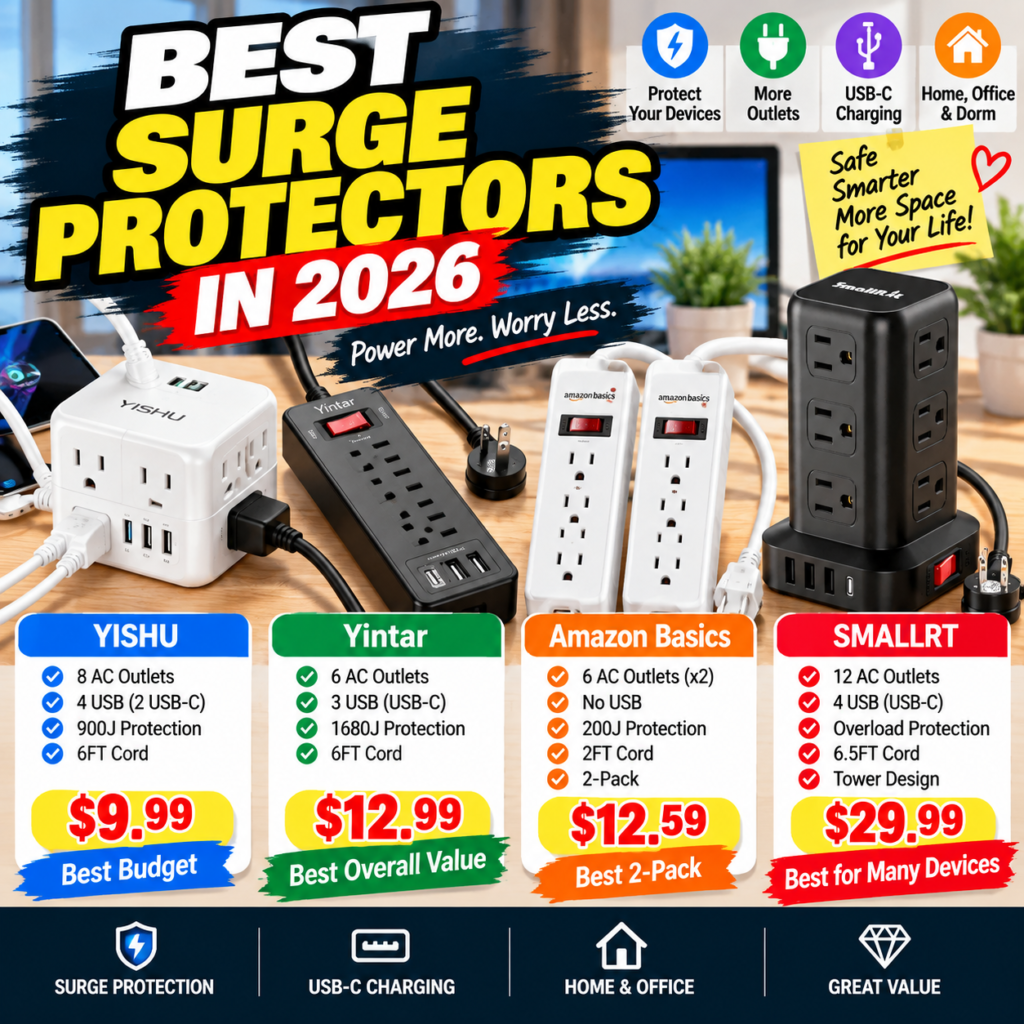
We compared four affordable options from SMALLRT, YISHU, Yintar, and Amazon Basics, ranging from just $9.99 to $29.99 at the time of our comparison.
The best choice depends on one simple question:
Do you need maximum outlets, stronger surge protection, USB charging, or simply a basic power strip that gets the job done?
Quick Comparison
| Product | Price Shown* | AC Outlets | USB | Surge Rating | Best For |
|---|---|---|---|---|---|
| YISHU | $9.99 | 8 | 4 | 900J | 💰 Best Budget |
| Yintar | $12.99 | 6 | 3 | 1680J | 🏆 Best Overall Value |
| Amazon Basics | $12.59 | 6 × 2 | None | 200J | 🔌 Best Basic 2-Pack |
| SMALLRT Tower | $29.99 | 12 | 4 | See current listing | 🖥️ Best for Many Devices |
*Prices shown are from the Amazon screenshots supplied for this comparison. Amazon prices and promotions can change at any time.
Quick Picks
🏆 Best Overall Value: Yintar 1680J
Only $12.99 in the supplied listing, yet it combines six AC outlets, three USB ports and a substantially higher advertised 1680-joule surge rating.
💰 Best Budget: YISHU
At $9.99 shown, you get eight AC outlets plus four USB ports.
🖥️ Best for Home Office: SMALLRT Tower
Twelve AC outlets plus four USB ports make this the most flexible option for a desk loaded with devices.
🔌 Best Simple 2-Pack: Amazon Basics
Two straightforward six-outlet strips for $12.59 shown—about $6.30 per strip.
1. Yintar 6-Outlet Surge Protector — Best Overall Value
Price Shown: $12.99*
The Yintar 6-foot surge protector stands out for a simple reason:
It gives you a lot of actual surge-protection capacity for very little money.
The model combines six AC outlets with three USB ports—two USB-A and one USB-C—and an advertised 1680-joule surge-protection rating. It also uses a 6-foot cord and includes an overload-protection switch. Newegg
Why It Stands Out
At the captured $12.99, Yintar costs only $3 more than the $9.99 YISHU.
Yet its advertised 1680J rating makes it particularly interesting for shoppers who care about more than simply adding outlets.
There’s also one widely spaced AC outlet designed to accommodate a larger power adapter without blocking every neighboring socket. Newegg
What You Get
- 6 AC outlets
- 2 USB-A ports
- 1 USB-C port
- 1680J advertised surge rating
- 6-foot cord
- 45° flat-plug design
- Overload protection
- Surge-protection indicator
- One wider-spaced outlet
The USB block is rated at a combined 15W according to available product specifications, so think of the built-in USB ports primarily as convenient everyday charging—not as a replacement for a modern high-wattage USB-C laptop charger. Newegg
Pros
- Excellent price
- 1680J advertised protection
- USB-C included
- Six-foot cable
- Flat plug
- Good balance of protection and charging
Cons
- Only six AC outlets
- USB-C isn’t a high-power USB-PD laptop charger
- Strip layout isn’t as space-efficient as a tower for a crowded desk
Best For
Home offices, computer desks, dorm rooms, entertainment centers and buyers wanting a better balance between price and surge rating.
Verdict
🏆 Best Overall Value
At only $12.99 shown, this is the product I’d position most prominently in the article.
You aren’t paying for unnecessary complexity—you are getting a practical combination of AC outlets + USB charging + a higher advertised joule rating.
Check Latest Price on Amazon – Yintar
2. YISHU 8-Outlet + 4 USB — Best Budget Pick
Price Shown: $9.99*
Now this is where the value comparison gets interesting.
For under $10 at the captured price, the YISHU gives you:
8 AC outlets + 4 USB ports.
The supplied Amazon listing shows two USB-A and two USB-C ports, a 6-foot extension cord, flat plug and an advertised 900J surge-protection rating.
That makes it an appealing choice for a dorm room or desk where the main problem is simply:
“I have too many things to plug in.”
Price Advantage
At $9.99 shown, it’s approximately:
$3 cheaper than Yintar
$2.60 cheaper than the Amazon Basics 2-pack
$20 cheaper than SMALLRT
For a sub-$10 accessory, that’s an impressive number of connections.
Pros
- Lowest captured price
- 8 AC outlets
- 4 USB ports
- USB-C included
- 6-foot cable
- Flat plug
- 900J advertised surge protection
- Widely spaced design
Cons
- Lower advertised joule rating than Yintar
- Not as many AC outlets as SMALLRT
- Integrated USB shouldn’t be confused with a dedicated high-wattage fast charger
Best For
College dorms, bedside charging stations, home offices and buyers who need lots of connections on a very small budget.
Verdict
💰 Best Budget
This is a classic Amazon value buy:
Spend around $10 and solve a very real everyday problem.
For many shoppers, eight outlets plus four USB ports may be all they need.
Check Latest Price on Amazon – YISHU
3. SMALLRT Power Strip Tower — Best for Lots of Devices
Price Shown: $29.99*
SMALLRT takes a completely different approach.
Instead of a traditional flat strip, this model uses a vertical tower design with 12 AC outlets and four USB ports.
That’s 16 charging/power connections from one station.
Available product information confirms the combination of 12 AC outlets, three USB-A ports, one USB-C port and a 6.5-foot cord, while the tower format is designed to minimize plugs blocking one another. 월마트
Why the Tower Design Matters
Imagine a home-office desk with:
- PC
- Two monitors
- Speakers
- Desk lamp
- Printer
- Phone charger
- Tablet charger
- Headphones
- Smartwatch
- Router
Suddenly, twelve outlets don’t sound excessive.
A tower distributes the outlets across multiple sides, which can make bulky adapters easier to organize.
Pros
- 12 AC outlets
- 4 USB ports
- USB-C included
- 6.5-foot cord
- Space-saving vertical design
- Good for multiple bulky plugs
- Overload protection
- One centralized charging station
Cons
- $29.99 is significantly more than the other three
- Overkill for a simple bedside setup
- Takes more vertical desk space
Best For
Large home-office setups, gaming desks, shared workspaces and anyone constantly running out of outlets.
Is the Extra $17–$20 Worth It?
That’s the key question.
Compared with Yintar, you’re paying roughly $17 more.
Compared with YISHU, you’re paying $20 more.
But you’re also getting 12 AC outlets.
If those extra outlets replace the need for another power strip, the higher upfront price starts making much more sense.
Verdict
🖥️ Best for Lots of Devices
Don’t buy SMALLRT because it’s the fanciest option.
Buy it if you’re genuinely tired of crawling under your desk to unplug one device before plugging in another.
That’s where the extra money earns its keep.
Check Latest Price on Amazon – SMALLRT Tower
4. Amazon Basics 6-Outlet 2-Pack — Best Simple Choice
Price Shown: $12.59*
Not everybody needs USB-C, 12 outlets or a charging tower.
Sometimes you simply need:
More outlets. In two different places.
That’s where the Amazon Basics 2-pack makes sense.
The supplied listing includes two six-outlet power strips, each with a 2-foot cord, circuit breaker, LED indicator, on/off switch and wall-mounting capability.
The listed surge rating is 200 joules.
The Value Isn’t Fancy Features
At $12.59 for two:
$12.59 ÷ 2 = about $6.30 per strip.
That’s the selling point.
Put one behind your TV and another beside your desk.
Or one in the bedroom and another in the home office.
Pros
- Two power strips included
- About $6.30 each at captured price
- Six outlets per strip
- Circuit breaker
- LED indicator
- On/off switch
- Wall mounting
- Simple design
Cons
- No USB ports
- Short 2-foot cord
- Only 200J advertised surge rating
- Less suitable for buyers prioritizing higher surge-energy ratings
Best For
Basic household electronics, lamps, chargers and buyers who need inexpensive outlet expansion in two locations.
Important Buying Point
This is exactly why readers shouldn’t compare power strips by price alone.
The Amazon Basics product is inexpensive per strip, but its 200J rating is substantially below Yintar’s advertised 1680J.
That doesn’t automatically make either product appropriate for every device or electrical environment; it means buyers should consider the protection specification alongside outlet count and price.
Verdict
🔌 Best Basic 2-Pack
If your priority is simply adding outlets around the house at minimum cost per strip, Amazon Basics is easy to understand.
Check Latest Price on Amazon – Amazon Basics
Which One Gives You the Most for Your Money?
Here’s where the buying decision becomes simple.
| If You Need… | Choose |
|---|---|
| Lowest price + lots of ports | YISHU |
| Best balance of protection & price | Yintar |
| Maximum number of connections | SMALLRT |
| Two simple power strips | Amazon Basics |
| Home-office setup | Yintar / SMALLRT |
| Dorm room | YISHU |
| Lots of bulky adapters | SMALLRT |
| Higher advertised joule rating among these four | Yintar |
What Does the Joule Rating Actually Mean?
This is worth explaining because it makes the article more useful than a typical affiliate roundup.
A surge protector’s joule rating describes the amount of surge energy its protection components are rated to absorb over their service life.
In this comparison, the supplied listings advertise:
Amazon Basics — 200J
YISHU — 900J
Yintar — 1680J
A higher joule rating can provide more surge-energy capacity, but joules alone do not tell you everything about protection quality.
And surge protectors should not be confused with an uninterruptible power supply (UPS), which can provide battery backup during an outage.
For an expensive desktop PC, NAS or other critical equipment, I’d evaluate the electrical-protection requirements separately rather than simply buying whichever strip has the most USB ports.
$9.99 vs $29.99: Should You Spend More?
This is probably the best conversion section in the article.
Spend around $10 if:
You’re powering a phone, lamp, tablet, basic computer accessories or dorm-room electronics.
➡️ YISHU
Spend around $13 if:
You want a better balance between surge rating, AC outlets and USB connectivity.
➡️ Yintar
Spend around $30 if:
Your desk looks like a cable jungle and you genuinely need 12 AC outlets.
➡️ SMALLRT
Buy the 2-pack if:
You need basic outlet expansion in two rooms and don’t care about built-in USB charging.
➡️ Amazon Basics
The smartest purchase isn’t always the cheapest product. It’s the cheapest product that actually solves your problem.
Final Verdict
🏆 Best Overall Value — Yintar
At the captured $12.99, Yintar hits the sweet spot.
Six AC outlets, three USB ports including USB-C, a six-foot cable and an advertised 1680J rating make it a strong everyday option. Newegg
💰 Best Budget — YISHU
At $9.99 shown, getting eight AC outlets plus four USB ports is compelling for a basic desk or dorm setup.
🖥️ Best for Home Office — SMALLRT
At $29.99, it’s the expensive option here—but 12 AC outlets plus four USB ports provide a level of connectivity the smaller strips simply can’t match. 월마트
🔌 Best Basic 2-Pack — Amazon Basics
Two strips for $12.59 shown works out to roughly $6.30 each.
If you don’t need USB charging, simplicity may be exactly what you want.
FAQ
What is the best surge protector in this comparison?
For the broadest range of buyers, Yintar offers the strongest balance of price, connections and advertised surge rating among these four.
Is a higher joule rating better?
Generally, a higher joule rating indicates greater cumulative surge-energy absorption capacity, but it should not be the only specification considered.
Do I need USB-C on my power strip?
Not necessarily. It’s convenient for phones and small electronics, but the USB-C ports built into inexpensive strips may not deliver the high wattage available from dedicated USB-C PD chargers.
Which power strip is best for a dorm room?
YISHU is particularly interesting because it combines eight AC outlets and four USB ports at the lowest captured price.
Which one is best for a home office?
For a typical office, Yintar offers a strong balance. For a desk with many devices, SMALLRT’s 12-outlet tower provides substantially more connectivity.
Should I use a cheap surge protector for an expensive gaming PC?
Don’t choose protection for expensive or mission-critical equipment solely on price or outlet count. Check the surge-protection specifications, electrical load requirements, safety certification and equipment manufacturer’s recommendations; a UPS may also be appropriate where battery backup is important.